AI toolsGoogle AI · 2/350 seconds
Google Stitch: turning an idea into an interface
One prompt describes an app, Stitch draws three coherent screens. The swipe works — the full journey is not wired.
In short
Stitch is Google Labs' AI-assisted design canvas: it turns a prompt, an image or code into web or mobile screens.
The test runs on a real app — read two opinions, swipe the card to vote, see the result — and returns three coherent screens from one prompt.
What you'll learn
- An interface prompt has structure: format, product goal, users, expected screens, visual mood.
- Stitch produces a shared visual direction across screens, not just isolated mockups.
- A visual prototype is not a product: the business logic still has to be written.
Step 1 / 5
What Stitch is
Google Labs' AI-assisted design canvas. It takes three kinds of input — a prompt, an image, or code — and returns web or mobile screens.
The format is chosen before anything else: it frames the generation.
Step 2 / 5
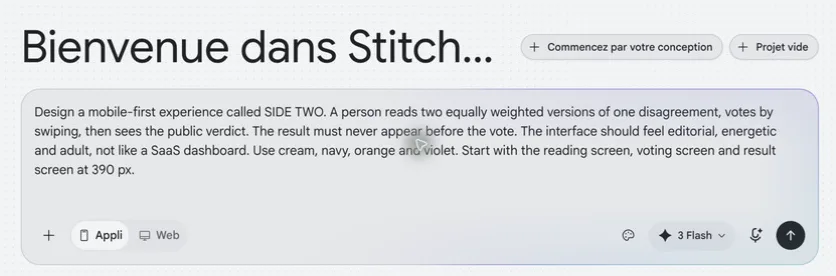
How the prompt is written
Four blocks are enough: the product goal, the intended users, the expected screens, and the visual mood.
Here the request is a mobile app where you read two opinions, swipe the card to vote, then see the result.
Step 3 / 5
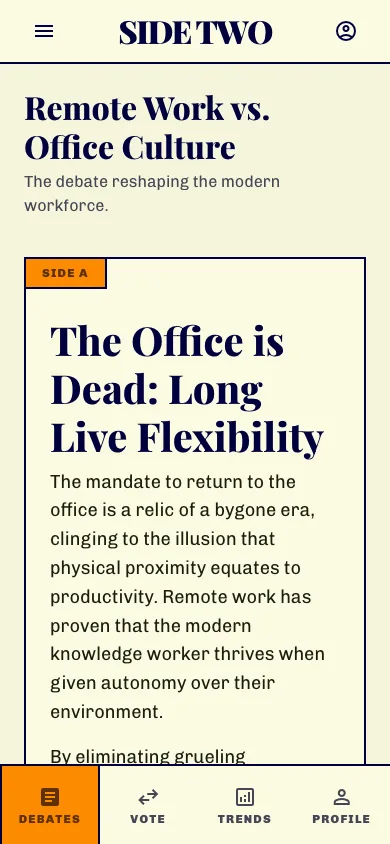
What Stitch returned
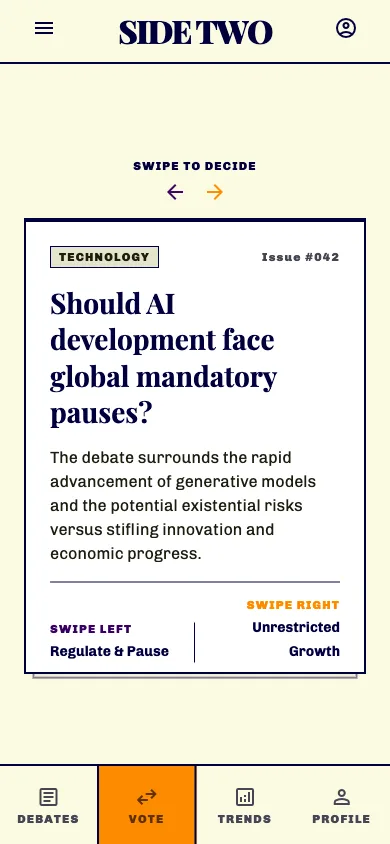
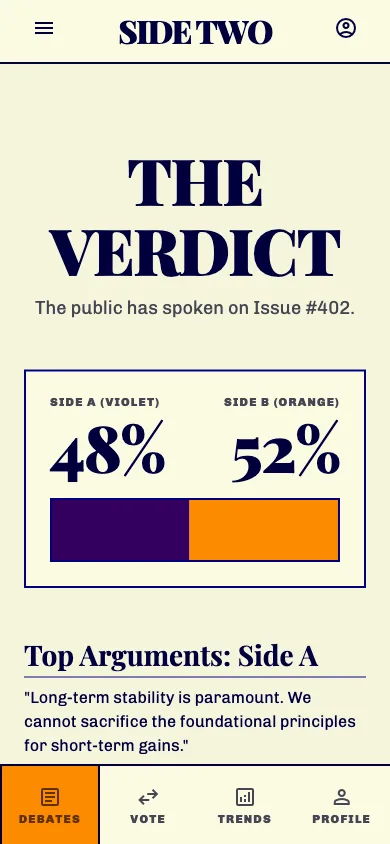
Three screens generated from one prompt: reading, voting, verdict. They share a common visual direction — cream, midnight blue, orange, purple, editorial headings and identical navigation.
The requested journey is visible across all three, without having to describe it screen by screen.
Step 4 / 5
Iterating on one screen
A screen can be selected, then varied: ask for alternatives, change the style, add the next screen.
Pages can be linked to test the prototype with Play. In this run, the voting interaction responds correctly to a swipe.
Step 5 / 5
What you get back
The design can be shared, exported, and its front-end code comes with it.
Work can then continue in AI Studio or Antigravity.
What came out
- Three HTML screens actually generated by Stitch, rendered at 390 px wide for checking.
- A voting interaction that responds to a swipe, captured on video.
- A consistent visual direction obtained from a single prompt.
What went wrong
- The three exported pages are not linked into a complete journey: the result screen exists on its own.
- The rule "never show the verdict before the vote" is therefore guaranteed by no business logic.
- Stitch speeds up design and one isolated interaction; it does not finish the product here.
Sources
- https://blog.google/innovation-and-ai/models-and-research/google-labs/stitch-ai-ui-design/
https://blog.google/innovation-and-ai/models-and-research/google-labs/stitch-ai-ui-design/
- https://blog.google/innovation-and-ai/models-and-research/google-labs/stitch-updates/
https://blog.google/innovation-and-ai/models-and-research/google-labs/stitch-updates/
- https://blog.google/innovation-and-ai/technology/developers-tools/google-ai-developer-updates-io-2025/
https://blog.google/innovation-and-ai/technology/developers-tools/google-ai-developer-updates-io-2025/
Behind the scenes
This episode came out of a pipeline, not twelve browser tabs.
Research, script, shots, media, editing, checks and publishing kit: ARGO Studio holds everything that produced this video.